


Mastering the Installation of Rack-Mount LiFePO4 Battery Modules: A Comprehensive Guide
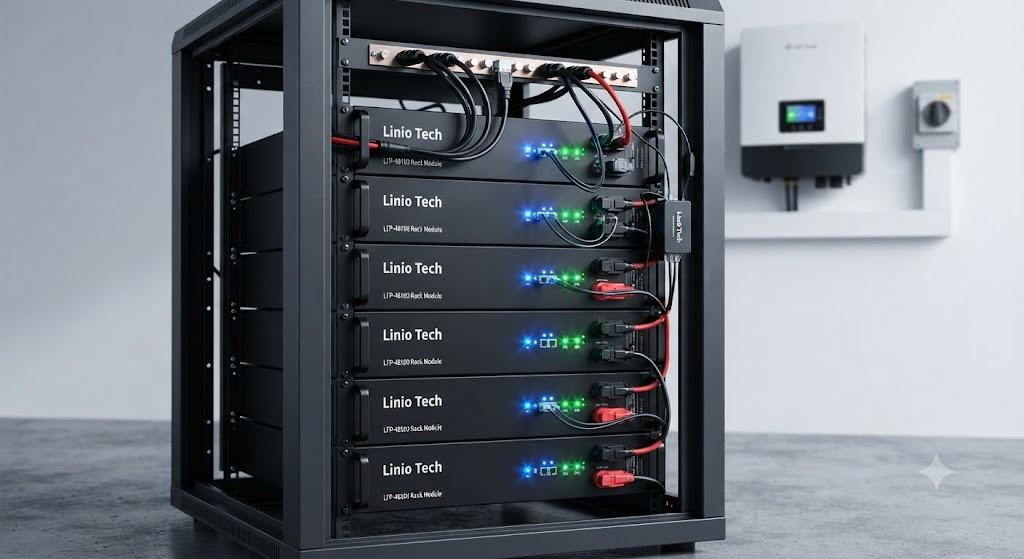
The transition to renewable energy systems has made lithium iron phosphate (LiFePO4) battery technology the industry standard for home and industrial energy storage. Renowned for their exceptional safety profile, long cycle life, and thermal stability, LiFePO4 batteries are the preferred choice for those looking to build reliable off-grid or hybrid solar systems.
Among the various configurations, the rack-mount LiFePO4 battery module stands out as the most professional and scalable solution. Whether you are setting up a home server, an industrial UPS, or a large-scale solar array, knowing how to properly Install a Rack LiFePO4 Battery Module is crucial for system safety and performance. In this guide, we will walk you through the essential steps and best practices for a seamless installation.
Why Install a Rack-Mount LiFePO4 Battery Module
Before diving into the technical installation, it is important to understand why rack-mount systems are superior to standalone configurations.
Scalability: Rack-mount systems allow you to add more capacity modularly.
Space Optimization: These modules are designed to fit into standard 19-inch server racks, keeping your equipment organized and secure.
Integrated Thermal Management: Modern racks provide superior airflow, which is critical for maintaining optimal operating temperatures for lithium batteries.
Pre-Installation Safety and Preparation
Safety must always come first when working with high-capacity battery systems.
Essential Tools
-
Insulated screwdrivers and torque wrenches.
-
Multimeter for voltage verification.
-
Personal protective equipment (PPE), including safety glasses and gloves.
-
Appropriate busbars or high-current cabling.
Checking Compatibility
Before you install a rack LiFePO4 battery module, verify that your inverter’s charge settings match the battery manufacturer's specifications. LiFePO4 chemistry requires specific charging voltages and cut-off points to ensure the battery management system (BMS) remains within safe operating parameters.
Step-by-Step: How to Install a Rack LiFePO4 Battery Module
Follow these steps to ensure a professional and safe installation.
Preparing the Rack
Ensure the rack is placed on a stable, level, and non-flammable surface. It should be located in a well-ventilated area away from direct sunlight and moisture. If your rack is not pre-installed with rails, attach them according to the rack manufacturer’s instructions.
Mounting the Modules
-
Slide the battery modules onto the rack rails.
-
Start from the bottom and work your way up to maintain a low center of gravity.
-
Once inserted, use the provided mounting brackets to bolt the modules securely to the rack frame. This prevents movement that could damage connections during thermal expansion or vibration.
Electrical Connections
This is the most critical part of the process.
Busbar Installation: If you are connecting multiple modules, use heavy-duty busbars to parallel the connections.
Cabling: Ensure all positive and negative cables are of the same length and gauge. Uneven cable lengths can cause unequal resistance, leading to improper load balancing across your battery bank.
Communication Cables: Connect the BMS communication cables (usually CAN or RS485) between modules. This allows the battery bank to communicate with the master controller or inverter, ensuring uniform charging and discharging.
Grounding
Never skip the grounding step. Connect the chassis ground of each battery module to the rack frame, and ensure the entire rack is properly connected to your system’s main grounding rod.
Commissioning and Testing
Once the physical installation is complete, do not power on the full system immediately.
Voltage Balancing: Use your multimeter to check the voltage of each module. They should be within 0.5V of each other before you connect them in parallel.
BMS Handshake: Power on the modules one by one. Check that the master module recognizes the slave modules.
Inverter Configuration: Access your inverter settings and input the specific LiFePO4 parameters as defined in your product manual.
Initial Charge: Perform a full charge cycle to allow the BMS to calibrate correctly.
Maintenance Tips for Longevity
Routine Inspection: Every six months, check cable connections for any signs of corrosion or overheating.
Firmware Updates: If your battery system supports remote monitoring, keep the firmware updated to ensure the BMS remains efficient.
Temperature Control: Keep your installation area between 15°C and 30°C for optimal cycle life.
Conclusion
Installing a rack-mount battery system is a significant step toward energy independence. By ensuring your rack is stable, cables are properly torqued, and communication links are secure, you create a robust energy storage foundation that will serve you for years to come. When you are looking for high-performance modules and reliable energy storage solutions, look no further than Linio Tech.
Also see our guide.

 English
 Arabic
 French
 Portuguese
 Deutsch
 Turkish
 Dutch
Dutch
 Italiano
 Russian
 Romaian
 Portuguese (Brazil)
 Greek
Greek
