


Integrating Claude with Enterprise Data Sources and APIs
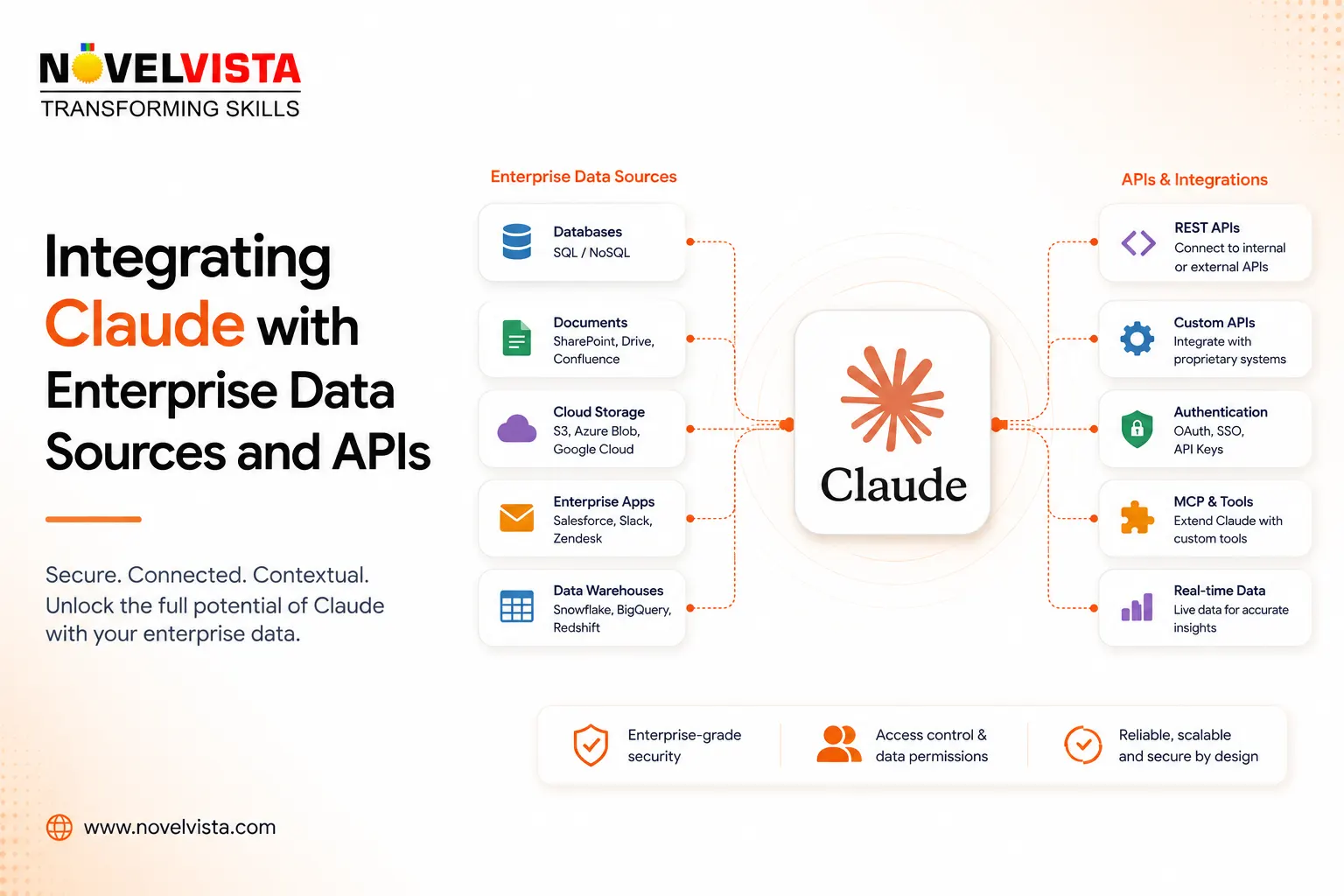
Enterprise AI becomes much more valuable when it can work with the information a company already has.
A standalone AI assistant can write emails, summarize text, generate code, and answer general questions. But organizations usually need something more practical. They want AI that can understand internal policies, search technical documentation, analyze customer records, work with project systems, query databases, and interact with existing business applications.
This is where integrating Claude with enterprise data sources and APIs becomes important.
Instead of treating Claude as an isolated chatbot, companies can connect it to the systems where their actual business knowledge lives.
Moving Claude Beyond the Chat Window
Most organizations have information spread across many systems.
Customer information may be stored in a CRM. Engineering documentation may live in GitHub or internal repositories. Policies could be stored in document management systems. Operational data may exist in PostgreSQL, Snowflake, data warehouses, ERP platforms, or proprietary applications.
Without integrations, employees still need to manually find information and paste it into an AI conversation.
With the right architecture, Claude can retrieve relevant information when it is needed.
For example, an employee could ask:
“What issues are currently delaying the Acme implementation?”
An enterprise AI application could potentially retrieve information from project-management tools, support systems, CRM records, internal documentation, and approved communications before Claude generates a response.
The model becomes an intelligent interface over enterprise knowledge rather than another place where employees have to manually move information.
Using the Claude API
One of the most flexible approaches is to build enterprise applications using the Anthropic API.
Developers can create an application that sits between Claude and internal systems. The application determines what information should be retrieved, what actions are permitted, and what context should be sent to the model.
A simplified architecture might look like:
Employee → Enterprise Application → Authentication → Internal Systems → Claude API → Response
Suppose a company wants an AI support assistant.
When an employee asks about a customer issue, the application could retrieve the customer's account information from the CRM, recent incidents from the support platform, and relevant troubleshooting documentation.
Only the information needed for that request needs to be provided to Claude.
This middleware layer is important because organizations should generally avoid giving an AI system unrestricted access to every internal database or application.
Connecting Systems Through Model Context Protocol
Another increasingly important integration mechanism is the Model Context Protocol, or MCP.
Anthropic introduced MCP as an open standard for connecting AI applications with external tools and data sources. In the MCP architecture, organizations can expose approved capabilities through MCP servers while AI applications act as clients that use those capabilities.
For example, an organization could create MCP connections for:
CRM systems
Document repositories
Git repositories
Databases
Business intelligence platforms
Ticketing systems
Internal APIs
MCP can reduce the need to build a completely different integration pattern for every AI application.
Instead, an organization might expose capabilities such as:
search_customer_records
retrieve_policy_document
get_project_status
search_code_repository
create_support_ticket
Claude can then use those capabilities when the task requires them.
Anthropic's ecosystem already uses MCP and connectors across a growing range of enterprise data sources and third-party platforms.
Retrieval Is Often Better Than Sending Everything
Connecting Claude to enterprise data does not mean placing an entire company database inside every prompt.
A better approach is usually retrieval.
When someone asks a question, the application first searches the relevant information sources. It retrieves the small amount of information that appears useful and provides that information to Claude as context.
For example:
Question:
“What is our policy for employees using personal devices while travelling?”
The system could search the company's policy repository and retrieve the most relevant sections of its mobile-device, security, and travel policies.
Claude then generates an answer grounded in those documents.
This architecture is commonly associated with Retrieval-Augmented Generation, or RAG.
The advantage is that enterprise information can remain in its source systems while the AI retrieves what it needs when a request is made.
APIs Can Let Claude Take Actions
Enterprise integrations can go beyond reading information.
Through carefully controlled tools and APIs, Claude-powered applications can also perform actions.
Imagine an IT service desk assistant.
An employee says:
“My laptop VPN is not working.”
Claude could gather troubleshooting information and determine that a support request is required.
An approved integration might then call the company's service-management API to create the ticket.
The workflow becomes:
Understand problem → Retrieve troubleshooting guidance → Ask necessary questions → Call API → Create ticket → Return ticket number
Similar patterns could support sales, HR, finance, engineering, procurement, and operations.
The important word, however, is controlled.
Systems that can modify data should generally have stronger safeguards than systems that only read information.
Give Claude the Minimum Access Necessary
AI integrations introduce a familiar security principle:
Least privilege.
If an AI assistant only needs to search product documentation, it should not also receive permission to modify production databases.
Anthropic itself has highlighted the importance of limiting tool permissions and containing the potential impact of connected AI systems. For example, read-only database access presents a significantly smaller risk than giving an agent permission to modify production systems.
Companies should therefore separate capabilities such as:
Read customer information
from:
Modify customer information
and separate:
Search production logs
from:
Execute production changes
High-impact actions may also require human confirmation before execution.
Authentication Should Follow the User
One of the biggest enterprise integration mistakes is connecting an AI system through one highly privileged service account.
Ideally, Claude should not magically gain broader access than the employee making the request.
If an HR employee can access certain personnel documents but an engineering employee cannot, the AI layer should preserve that distinction.
Integration architectures should therefore consider:
User authentication
Role-based access control
API scopes
Resource permissions
Department policies
Data classification
Claude Enterprise also provides enterprise controls including SSO, SCIM, role-based permissions, audit logs, and custom data-retention controls.
Treat External Content as Potentially Untrusted
Connecting more data also creates a new security problem: Claude may process information that was written by someone outside the organization.
A document, support ticket, webpage, GitHub repository, or connected system could contain malicious instructions designed to manipulate an AI agent.
This is known as prompt injection.
Anthropic has specifically warned that data arriving through MCP servers, plugins, web tools, and other external sources can introduce prompt-injection risks.
Organizations therefore need controls around both the connector itself and the content coming through it.
This may include restricting available tools, validating API inputs, isolating high-risk operations, requiring confirmation for sensitive actions, and logging important agent activity.
Enterprise Data Privacy Still Matters
Organizations naturally need to understand how proprietary information is handled when using AI APIs.
Anthropic states that, by default, inputs and outputs from its commercial products, including Claude for Work and the Anthropic API, are not used to train its generative models unless the customer explicitly opts in or provides material through certain feedback mechanisms.
For Claude for Work, Anthropic also describes the customer organization as the controller of submitted data while Anthropic acts as a processor providing the service on the customer's behalf.
Organizations still need to evaluate retention requirements, regulatory obligations, data classifications, third-party integrations, and their own internal security architecture before connecting sensitive systems.
Build an Enterprise AI Integration Layer
For larger organizations, connecting each AI project directly to every corporate system can quickly become difficult to govern.
A more scalable approach is to create a controlled integration layer.
It might contain:
Claude API
↓
AI orchestration / agent layer
↓
Authentication and authorization
↓
MCP servers and enterprise APIs
↓
CRM | ERP | Databases | Documents | Git | Service Desk | Data Warehouse
Alongside this architecture should be:
Audit logging
Data-loss prevention
Permission enforcement
Human approval
Monitoring
Cost controls
Security policies
Anthropic has also introduced enterprise capabilities such as its Compliance API, which can provide authorized administrators with programmatic access to organizational Claude usage information for compliance and governance workflows.
The Real Opportunity Is Connected Intelligence
Integrating Claude with enterprise systems is not simply about making a chatbot smarter.
The larger opportunity is to create an intelligent layer across organizational knowledge and workflows.
Employees could ask questions without knowing which database contains the answer. Developers could investigate issues across code and documentation. Service teams could combine customer information with support knowledge. Business leaders could analyze information scattered across multiple systems.

 Arabic
 French
 Spanish
 Portuguese
 Deutsch
 Turkish
 Dutch
Dutch
 Italiano
 Russian
 Romaian
 Portuguese (Brazil)
 Greek
Greek
