


Building an AI Agent in n8n: Triggers, Tools, and Logic Nodes
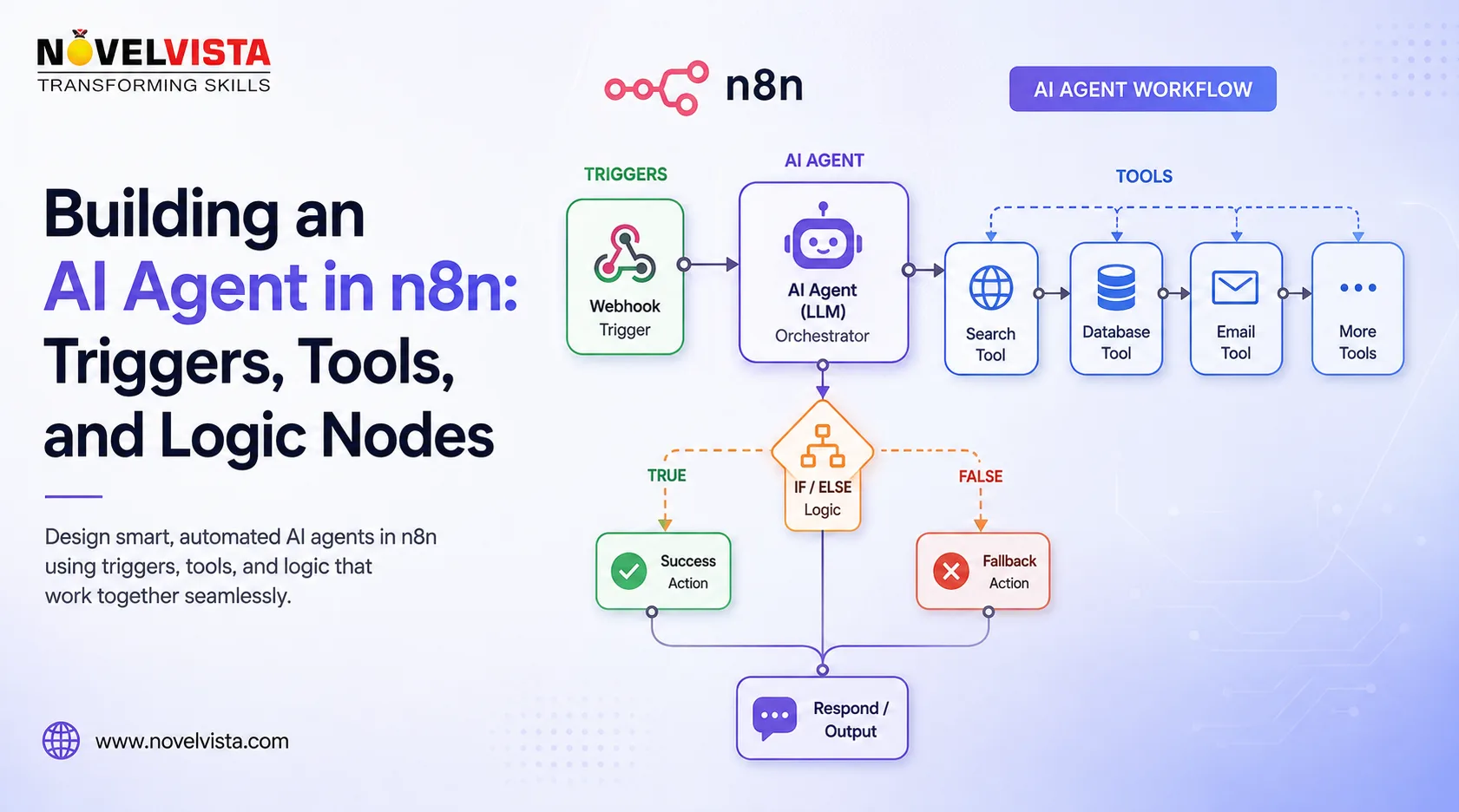
AI agents are moving automation beyond fixed workflows. An agent can interpret a request, choose a tool, collect information, and decide what action to take next. n8n makes this practical by combining visual automation with AI models, application integrations, conditional logic, and data processing.
What Is an AI Agent in n8n?
An AI agent in n8n uses a language model to understand a goal and determine how to complete it. It can call APIs, search information, retrieve records, or update business systems.
The current n8n AI Agent works as a Tools Agent. The model does more than generate text: it examines connected tools, understands their described capabilities, and selects one when needed. A practical setup includes a trigger, chat model, tools, and workflow logic.
Starting with Triggers
Every n8n workflow begins with a trigger. It defines when the agent should run and what initial data it receives.
A Chat Trigger suits conversational assistants because it starts the workflow when a user sends a message. A Webhook Trigger accepts requests from applications or internal systems. Schedule triggers handle recurring work, while application triggers can respond to events such as a new email, form submission, CRM lead, or support ticket.
The trigger depends on the use case. A support agent may start with an incoming message. A sales agent may run when a lead enters the CRM. A reporting agent may prepare a scheduled summary.
Connecting the Language Model
The AI Agent needs a chat model to interpret instructions and plan a response. The model handles reasoning, while n8n manages execution.
A clear system message should define the agent’s role, objective, permitted actions, response format, and restrictions. For example, a support agent might be told to search an approved knowledge base before answering and escalate requests involving refunds.
Avoid vague instructions such as “help the user.” Specific boundaries make the agent more predictable and reduce unnecessary tool calls.
Giving the Agent Tools
Tools let the agent interact with external systems. A tool might search a database, retrieve a customer record, send an email, create a task, call an API, or calculate a value.
Many n8n application nodes can be connected as AI tools. Parameters may come from workflow data, fixed settings, or values selected by the model. Tool descriptions should explain what each tool does and when to use it.
Do not give an agent unrestricted access to sensitive operations. Read-only tools are safer during early testing. Deleting records, changing permissions, sending external messages, or approving financial actions should require validation or human authorization.
Controlling Decisions with Logic Nodes
The agent does not need to make every decision. Standard n8n logic nodes can place deterministic guardrails around AI output.
The If node routes data between two paths, while the Switch node supports several outcomes. A classified support message, for example, could send routine questions to an automated response, complaints to a support queue, and urgent risks to a manager.
This separation improves reliability. AI can interpret unstructured information, while fixed workflow rules control high-impact actions.
Adding Memory and Human Oversight
Memory helps an agent retain selected conversational information across messages. n8n provides memory components, including Simple Memory for straightforward conversations. Memory should be used carefully because unnecessary retention can create privacy, relevance, and context-quality problems.
Human review is equally valuable. An approval step can be placed before a sensitive tool so an employee can accept, reject, or edit the proposed action. This balances automation and accountability. n8n supports human-in-the-loop patterns for reviewing tool actions before they are executed.
Testing and Improving the Agent
Before deployment, test normal requests, missing information, conflicting instructions, and unexpected inputs. Review execution data to see which tools were selected and how information moved through the workflow.
Start with a narrow use case, limited permissions, and measurable success criteria. Once the workflow performs reliably, introduce more tools and decision paths gradually.
Conclusion
Building an AI agent in n8n is not simply about connecting a language model to applications. A dependable agent needs the right trigger, clearly defined tools, structured prompts, controlled logic, appropriate memory, and human oversight. When these elements work together, n8n can turn AI from a conversational feature into a practical automation layer for real business processes.

 English
 Arabic
 French
 Portuguese
 Deutsch
 Turkish
 Dutch
Dutch
 Italiano
 Russian
 Romaian
 Portuguese (Brazil)
 Greek
Greek
