


Connecting Amazon Quick Suite to Enterprise Data Sources
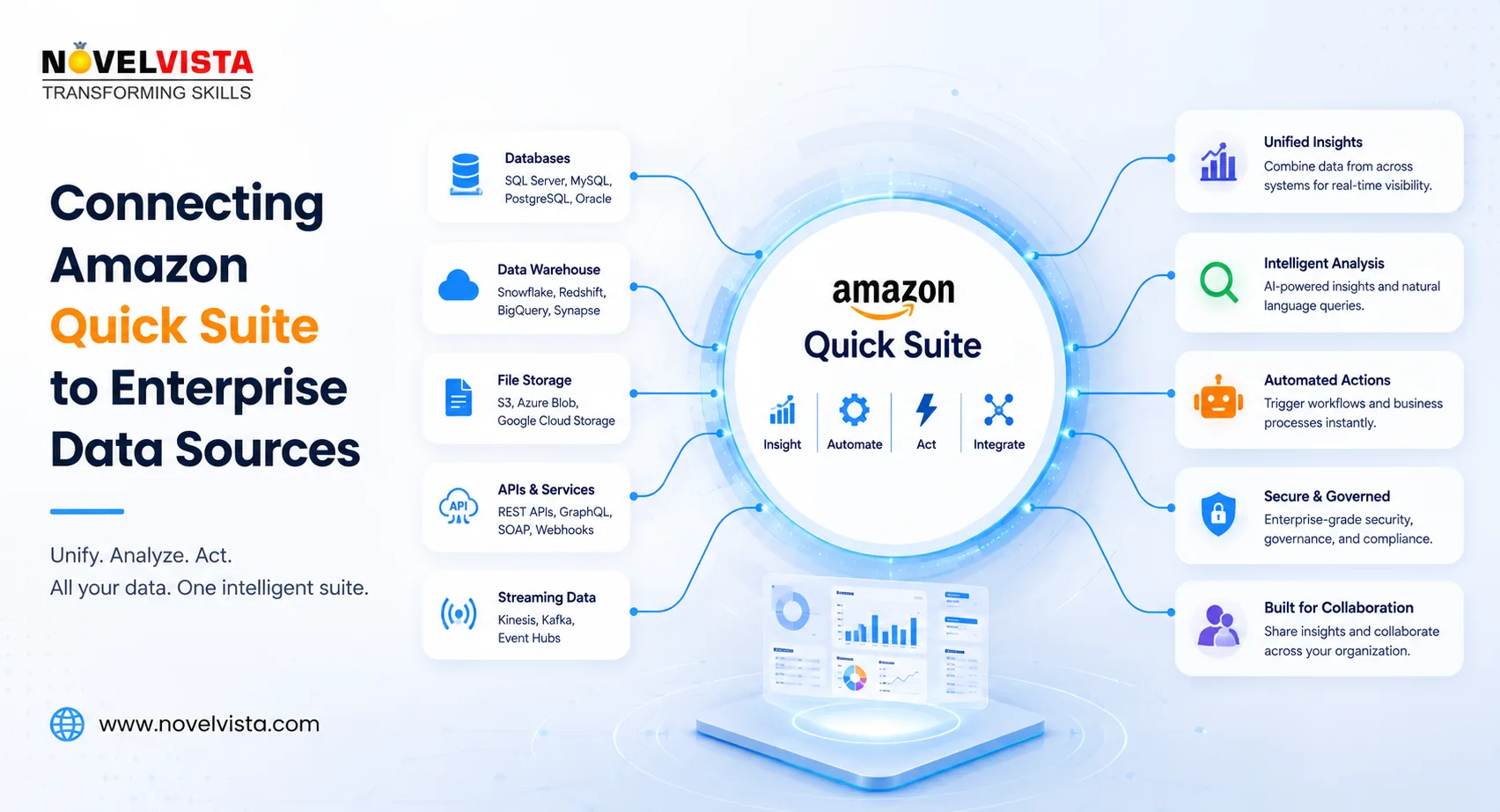
Enterprise information rarely exists in one system. Customer records may be stored in a CRM, operational data in cloud databases, policies in SharePoint, project knowledge in Confluence, files in Amazon S3, and performance metrics in data warehouses. Employees often spend considerable time searching these platforms, reconciling information, and preparing reports before they can make a decision.
Amazon Quick Suite addresses this challenge by providing an AI-powered workspace that can retrieve information from connected business systems, analyse data, generate insights, and support automated actions. Launched by AWS in October 2025, the platform brings together business intelligence, research, generative AI, and workflow automation capabilities.
Understanding Amazon Quick Suite Integrations
Amazon Quick Suite uses integrations to connect its AI agents and analytics capabilities with enterprise applications and data platforms. AWS documentation separates these integrations into different categories based on their purpose.
Data-access integrations allow Quick Suite to retrieve and index information from external sources. These connections form the foundation of knowledge bases that employees can query using natural language. Action connectors serve a different purpose: they allow AI agents to perform operations in connected applications rather than simply reading information.
This distinction is important. A connection to a document repository may help an employee find a policy, while an action connector could enable the system to create a task, send a message, update a record, or initiate another approved business process.
Connecting Enterprise Documents
Many organisations begin by connecting document repositories. Amazon Quick can create knowledge bases using content stored in systems such as Amazon S3, Microsoft SharePoint, Microsoft OneDrive, Confluence, Google Drive, and supported web sources. Quick keeps its index synchronised as connected content changes, helping users receive answers based on current enterprise information.
For an Amazon S3 integration, administrators select the approved buckets and grant Quick Suite the necessary permissions. Documents are then ingested and indexed so that employees can search and analyse them through natural-language conversations. AWS states that this capability requires an Enterprise subscription and explicit access to the relevant S3 resources.
This approach can support use cases such as policy discovery, technical-documentation search, contract analysis, product-support assistance, and internal research.
Connecting Databases and Analytics Platforms
Amazon Quick Suite also incorporates the data connectivity capabilities associated with Amazon QuickSight. Supported relational and analytical sources include Amazon Athena, Amazon Aurora, Amazon Redshift, Amazon OpenSearch Service, Amazon S3, Microsoft SQL Server, MySQL, PostgreSQL, Oracle, Snowflake, Databricks, and other compatible systems.
After administrators configure a connection, teams can create datasets for dashboards and analysis. Depending on the source, the connection may use public networking or an Amazon Virtual Private Cloud connection. Additional configuration can include credentials, Secure Sockets Layer settings, API tokens, and network-security rules.
Quick Suite can also combine information from multiple sources. For example, an organisation could join sales transactions from a data warehouse with customer information from another database, enabling a more complete view without manually duplicating every source dataset.
Connecting SaaS Applications
Enterprise data also resides in software-as-a-service applications. Quick Suite’s SaaS connectivity can allow authorised teams to analyse third-party application data using managed connectors and OAuth-based authentication. This reduces the need to repeatedly export files into an intermediate storage platform before analysis.
Action connectors extend this model further. For example, the Microsoft Outlook connector can provide controlled access to supported email, calendar, and contact operations. Authentication can be handled through an AWS-managed OAuth application or an organisation’s preferred configuration, depending on security requirements.
Quick Suite can also connect to REST APIs, allowing organisations to integrate internal applications or services that do not have a ready-made connector. Administrators configure the API base URL, authentication method, and approved automation access through the Quick Suite console.
Security and Governance Considerations
Connecting enterprise data requires more than technical access. Organisations should apply least-privilege permissions, restrict connections to approved repositories, and ensure that users only receive information they are authorised to view.
Administrators should also define which AI agents can access each knowledge base and which external actions they can perform. Read access, analytical access, and action permissions should be treated as separate governance decisions.
Monitoring is equally important. Amazon Quick provides administrative analytics covering chat activity, research interactions, space usage, flow executions, action invocations, automations, and custom-agent usage. These metrics can help organisations understand adoption, investigate unusual behaviour, and improve governance controls.
A Practical Implementation Approach
A successful implementation should begin with one high-value use case rather than connecting every enterprise platform immediately. An organisation might start with approved policies in Amazon S3, customer metrics in Amazon Redshift, or project documentation in Confluence.
The team should then validate permissions, data quality, answer accuracy, indexing frequency, and employee experience. Once governance and business value are established, the architecture can expand to additional data sources and action connectors.
Connecting Amazon Quick Suite to enterprise data is therefore not simply an integration project. It creates a unified intelligence layer through which employees can find information, analyse operational data, and move from insight to action without continuously switching between disconnected systems.

 English
 Arabic
 French
 Spanish
 Deutsch
 Turkish
 Dutch
Dutch
 Italiano
 Russian
 Romaian
 Portuguese (Brazil)
 Greek
Greek
