


Sticky Add to Cart Button: Make Shopify Shopping Easier
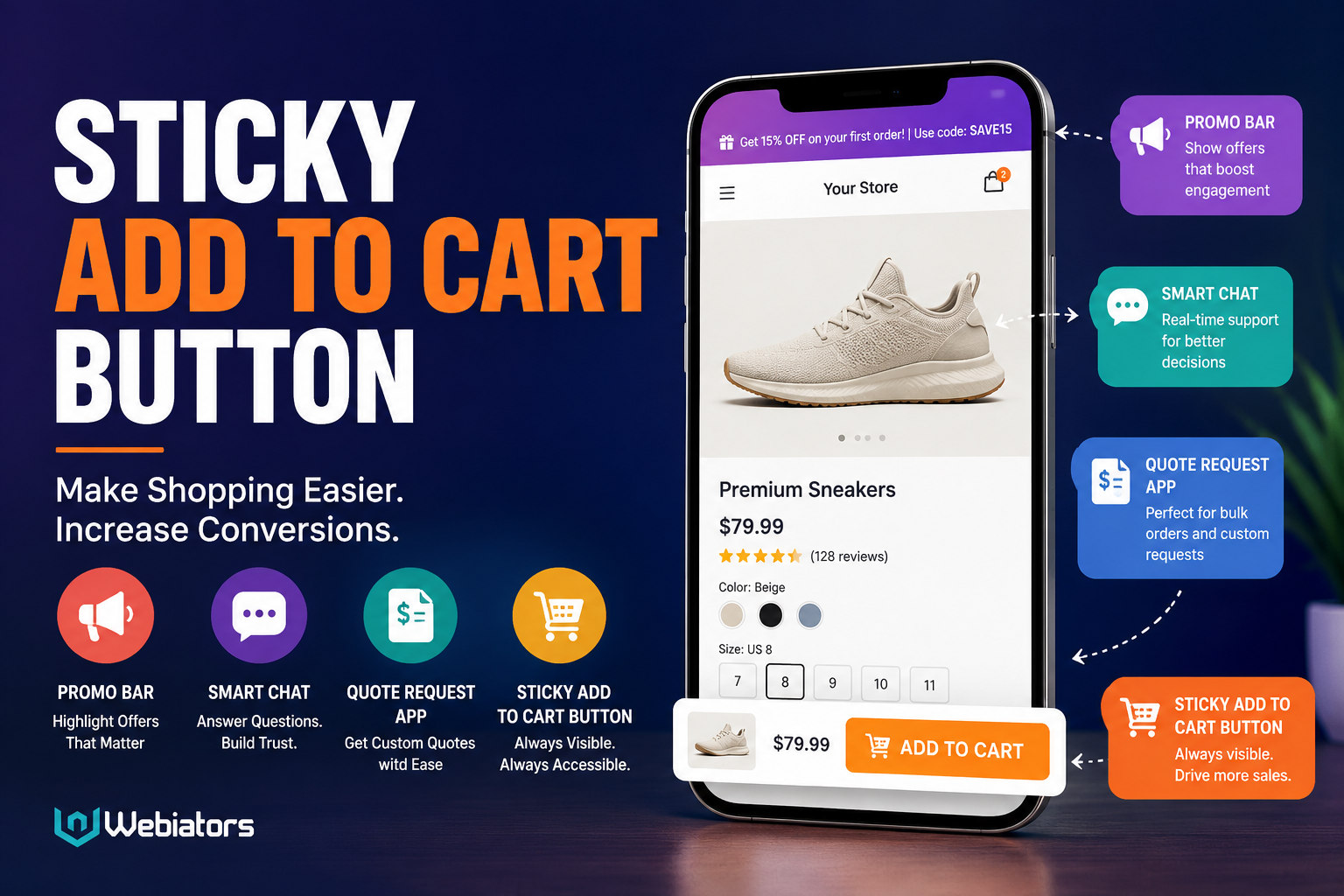
Online shoppers expect a simple and fast buying experience. When customers find a product they like, they should not have to scroll repeatedly just to locate the purchase option. This is where a Sticky Add to Cart Button can improve the shopping journey. It keeps the buying action visible while customers browse product information, images, reviews, and other details.
For Shopify stores, combining a sticky purchase option with tools such as a Promo Bar, Smart Chat, and Quote Request App can create a more convenient and conversion-focused storefront.
What Is a Sticky Add to Cart Button?
A Sticky Add to Cart Button is a fixed purchase element that remains visible while a shopper scrolls through a product page. Instead of forcing visitors to return to the original product section, the add-to-cart option stays accessible.
This can be particularly useful on mobile devices, where long product pages require considerable scrolling.
A well-designed sticky button should remain noticeable without covering important product information. It should also work smoothly with the store's existing cart and checkout process.
Why Does Sticky Add to Cart Matter for Shopify Stores?
Product pages often contain extensive information. Customers may want to check product specifications, shipping details, reviews, sizing information, or FAQs before purchasing.
During this process, the original Add to Cart button can disappear from view.
A Sticky Add to Cart Button solves this usability issue by keeping the purchase action available. It reduces unnecessary navigation and allows shoppers to add products whenever they feel ready.
The goal is not simply to add another button. The goal is to make the buying process more convenient.
How a Sticky Add to Cart Button Supports Conversions
A smoother user experience can remove small obstacles that interrupt purchasing decisions.
A sticky purchase option can help by:
- Keeping the main shopping action visible
- Reducing excessive scrolling
- Supporting faster product-page navigation
- Improving mobile shopping usability
- Making the purchasing process more accessible
- Helping customers act when purchase intent is high
For example, imagine a customer reading reviews near the bottom of a product page. If they decide to purchase at that moment, they can use the sticky purchase option instead of scrolling back to the top.
That small improvement can make the shopping experience feel considerably easier.
Use a Promo Bar to Communicate Important Offers
A Promo Bar can work alongside a Sticky Add to Cart Button by communicating important store information without requiring shoppers to search for it.
A store might use a promo bar to highlight:
- Free shipping thresholds
- Limited-time discounts
- Seasonal offers
- New product launches
- Special shopping events
- Important delivery information
However, the message should remain short and clear. Too many announcements can distract visitors from the product itself.
The sticky purchase option and promo bar serve different purposes: one supports the buying action, while the other communicates useful information.
Add Smart Chat for Customer Questions
Even with an optimized product page, shoppers may have questions before purchasing. They may want to know about delivery, product compatibility, sizing, customization, or returns.
This is where Smart Chat can become useful.
A Smart Chat feature can give customers an easy way to ask questions while they browse. Instead of leaving the product page to find contact information, visitors can start a conversation directly from the storefront.
When combined with a Sticky Add to Cart Button, the customer journey becomes more connected:
Discover product → Read information → Ask questions → Add to cart → Checkout
This approach can help reduce uncertainty and make the shopping experience more interactive.
When Should You Use a Quote Request App?
Not every ecommerce product is purchased through a standard checkout.
Businesses selling bulk products, customized goods, wholesale items, or services may need customers to request pricing before placing an order.
A Quote Request App can support this type of shopping journey.
For example, a customer may be interested in purchasing a large quantity but want to discuss pricing first. Instead of forcing that visitor through a standard checkout process, a quote request option can provide another path.
This makes the storefront more flexible for different customer needs.
Sticky Add to Cart vs. Traditional Add to Cart
The traditional Add to Cart button appears within the product section and may disappear as visitors scroll.
A Sticky Add to Cart Button remains accessible during scrolling.
The difference is mainly about convenience:
| Feature | Traditional Add to Cart | Sticky Add to Cart |
|---|---|---|
| Visible while scrolling | Usually no | Yes |
| Mobile convenience | Moderate | High |
| Quick purchasing access | Limited | Strong |
| Long product pages | Less convenient | More convenient |
| Supports faster action | Depends on navigation | Easier |
A sticky button does not replace good product-page design. It complements it.
Best Practices for Sticky Add to Cart
A sticky button should be helpful rather than intrusive. Keep these points in mind:
Keep the design simple: Customers should immediately understand what the button does.
Match your store design: Use styling that fits the overall storefront.
Optimize for mobile: Make sure the button is easy to tap without blocking important content.
Show relevant product information: If appropriate, include the product name, price, or selected variant.
Avoid unnecessary distractions: The purchase action should remain clear.
Test the experience: Check the button across different devices and product templates.
How These Features Work Together
A strong ecommerce experience is rarely based on one feature.
The Sticky Add to Cart Button helps customers take action. The Promo Bar communicates timely information. Smart Chat helps answer questions, while a Quote Request App gives customers an alternative purchasing route when standard checkout is not suitable.
Together, these tools can support different stages of the customer journey without making the storefront unnecessarily complicated.
For Shopify merchants, Webiators provides solutions that can be considered when building a more convenient and customer-focused shopping experience.
Final Thoughts
A successful Shopify store should make purchasing feel simple. Customers should be able to find information, ask questions, understand offers, and take action without unnecessary friction.
A Sticky Add to Cart Button can keep the purchase action accessible throughout the product page, while a Promo Bar, Smart Chat, and Quote Request App can address other parts of the customer journey.
The most effective approach is to use these features strategically, keeping usability at the center of the design. When every element has a clear purpose, the storefront can become easier to navigate and more comfortable for shoppers.

 English
 Arabic
 Spanish
 Portuguese
 Deutsch
 Turkish
 Dutch
Dutch
 Italiano
 Russian
 Romaian
 Portuguese (Brazil)
 Greek
Greek
