


Designing Custom Instructions That Actually Improve AI Output
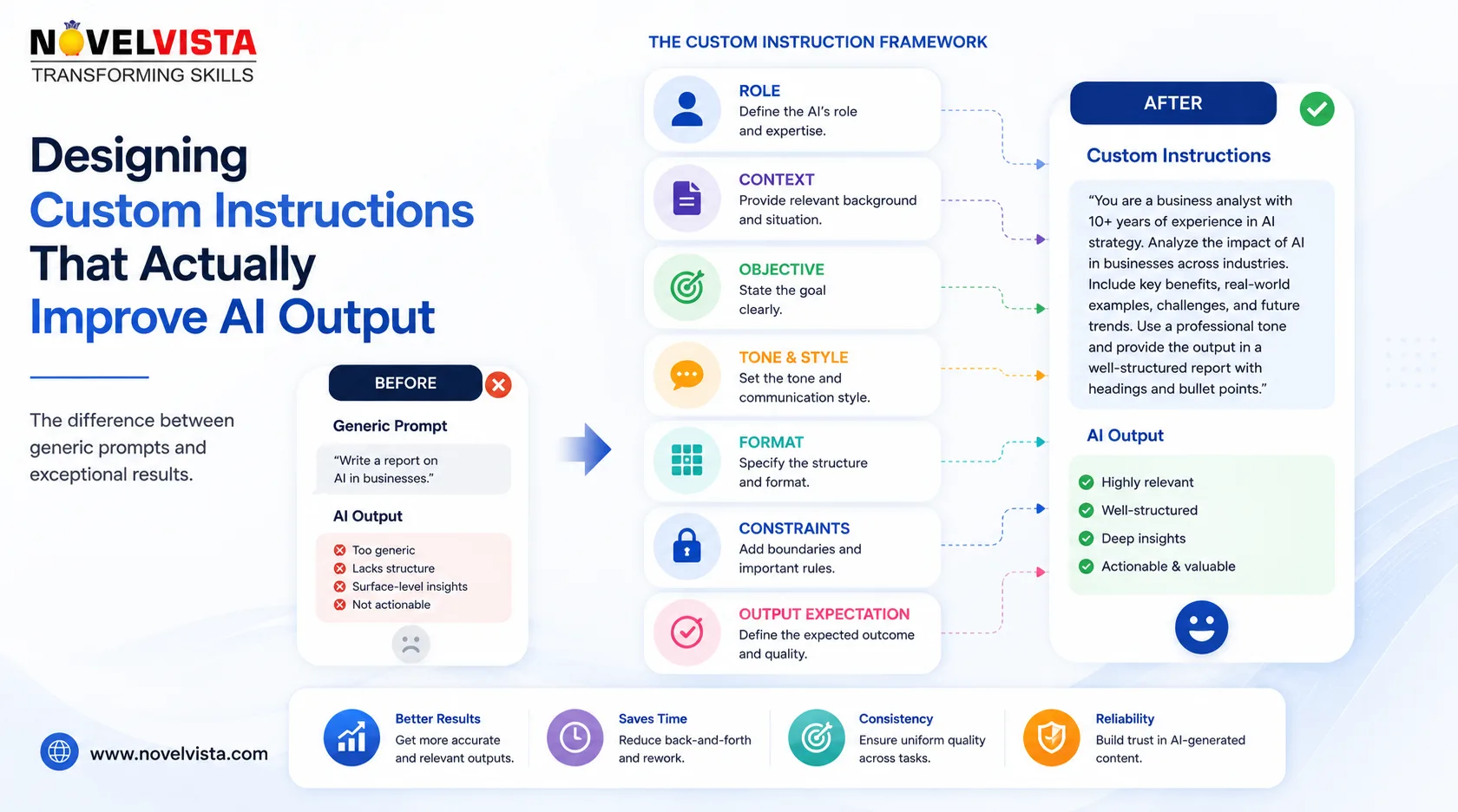
AI tools can generate impressive results, but the quality of those results often depends on the instructions they receive. Many users rely on short prompts such as “write an email,” “summarize this document,” or “create a report.” These requests may produce acceptable content, but they rarely deliver consistent, business-ready output.
Custom instructions provide the AI with ongoing guidance about how it should respond, what context it should consider, and which standards it should follow. When designed properly, they reduce repeated prompting, improve consistency, and help users receive more relevant results.
However, effective custom instructions are not simply long descriptions. They must be clear, practical, and connected to real work.
Start With the Desired Outcome
Before writing instructions, identify what better output actually means. A marketing professional may want persuasive and engaging content, while a compliance manager may prioritize accuracy, neutrality, and traceability.
Instead of writing a vague instruction such as “give high-quality answers,” define the characteristics of a useful response.
For example:
“Provide concise recommendations for senior business leaders. Highlight business impact, implementation risks, and the next recommended action.”
This gives the AI a clearer understanding of the audience, response structure, and decision-making context.
Good Custom GPT instructions focus on outcomes rather than broad expectations.
Provide Relevant Context
AI performs better when it understands the environment in which the user works. Useful context may include the user’s role, industry, technical experience, audience, products, and common responsibilities.
A cloud engineer might provide the following instruction:
“I work on enterprise cloud infrastructure and automation. When answering technical questions, prioritize secure, scalable, and cost-efficient approaches. Include implementation steps and operational risks.”
This helps the AI tailor its responses without requiring the user to repeat the same background in every conversation.
The goal is not to include every personal or organizational detail. Only include information that regularly influences the type of output required.
Define the Audience
One of the most important elements of custom instructions is the intended audience. The same topic may need to be explained differently to an executive, developer, customer, or student.
For example:
“Write for business stakeholders with limited technical knowledge. Explain technical concepts in simple language and connect them to business value.”
Alternatively:
“Write for experienced software engineers. Use technical terminology, implementation examples, and architecture considerations.”
Without audience guidance, AI may produce content that is either too basic or unnecessarily complex.
Specify the Preferred Structure
Structure can significantly improve usability. If users frequently need status updates, reports, proposals, or technical documentation, the instructions should define the preferred format.
A useful instruction may be:
“Organize responses with a brief summary, key findings, risks, and recommended next steps. Use headings and short paragraphs. Avoid excessive bullet points.”
This reduces the time spent reformatting the response after it has been generated.
However, instructions should not force every response into the same format. A rigid structure can make simple answers unnecessarily long. It is better to describe a default format while allowing flexibility when the request is straightforward.
Set Tone and Writing Style
Tone affects how the message is received. Custom instructions can define whether the AI should sound formal, conversational, persuasive, analytical, or empathetic.
Instead of saying “write professionally,” provide more specific guidance:
“Use a confident and professional tone. Keep the language natural and direct. Avoid exaggerated claims, unnecessary jargon, and overly promotional wording.”
This type of instruction is easier for the AI to apply consistently.
Organizations can also use tone guidelines to align AI-generated content with their brand voice.
Include Boundaries and Quality Controls
Custom instructions should also explain what the AI must avoid. These boundaries are especially important when working with business, legal, financial, or technical content.
Examples include:
“Do not invent statistics, customer examples, or source references.”
“Clearly identify assumptions when information is incomplete.”
“Do not recommend production changes without including security and rollback considerations.”
These rules reduce the risk of polished but unreliable output. They also encourage the AI to communicate uncertainty instead of presenting assumptions as facts.
Use Examples Carefully
Examples are one of the strongest ways to guide AI behaviour. A short example can show the expected level of detail, wording, and structure more effectively than a long explanation.
For instance:
“Preferred recommendation format: ‘Adopt the solution for a controlled pilot because it reduces manual processing. The primary risks are data quality and user access. Begin with one department and review results after four weeks.’”
Examples should represent the desired pattern, not content that must be repeated in every response.
Avoid Conflicting Instructions
Custom instructions often become less effective when too many rules are added. Instructions such as “be concise,” “provide complete detail,” “avoid long responses,” and “explain every step” may conflict with one another.
Prioritize the most important requirements and arrange them logically. A practical structure is:
- User and business context
- Primary audience
- Preferred response format
- Tone and writing style
- Accuracy and safety rules
- Common tasks and examples
Review the instructions regularly and remove anything that no longer improves the output.
Test and Refine Over Time
Custom instructions should be treated as a working configuration, not a one-time setup. Test them using common tasks and compare the results.
Check whether the output is more relevant, consistent, accurate, and easier to use. When problems appear, update the specific instruction causing the issue rather than adding several new rules.
Well-designed custom instructions create a reliable foundation for AI interaction. They cannot replace a clear task-specific prompt, but they can ensure that every conversation begins with the right context, expectations, and quality standards.

 English
 Arabic
 French
 Spanish
 Portuguese
 Deutsch
 Turkish
 Dutch
Dutch
 Russian
 Romaian
 Portuguese (Brazil)
 Greek
Greek
