


Task Management App vs WhatsApp Groups: What's Better for MSME Teams in 2026
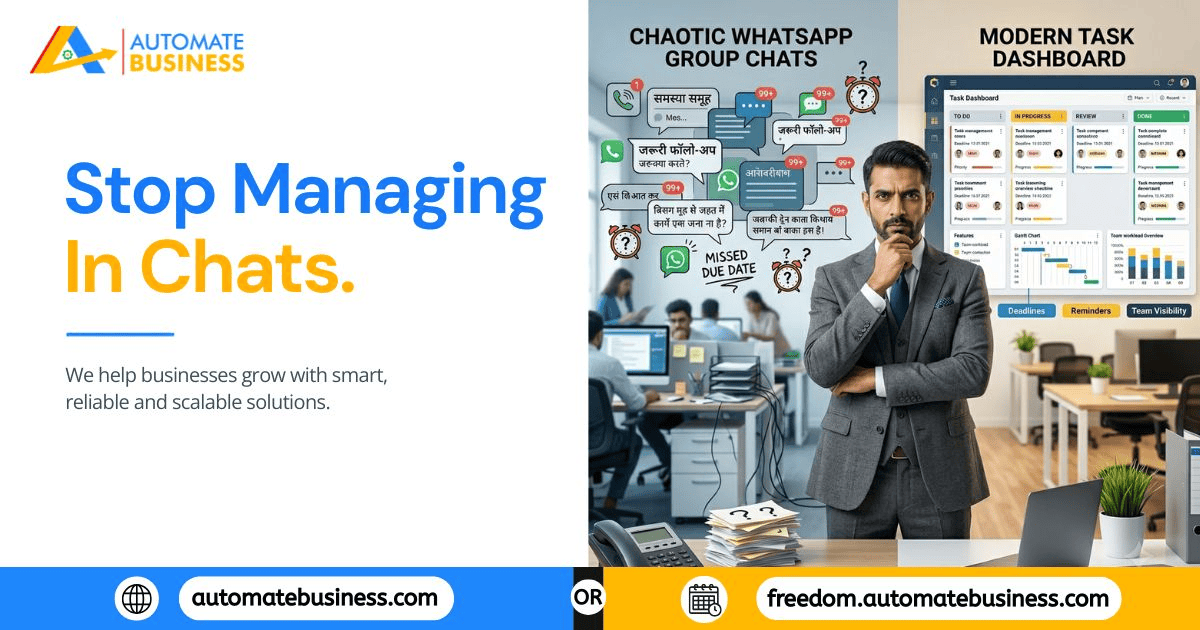
Walk into any small or mid-sized business in India and you'll find the same setup: three to five WhatsApp groups with names like "Office Team," "Production Updates," and "Sales Team 2026." Tasks get dropped in. People react with a thumbs-up emoji. Work either happens or it doesn't and nobody is entirely sure which until someone asks. It works. Until it really, really doesn't.
As MSMEs across India scale adding headcount, branches, departments, or client volume the cracks in WhatsApp-based task management widen fast. But switching to a dedicated task management app feels like a big decision, and many owners wonder: is it actually worth it, or is WhatsApp good enough?
This is the honest, feature-by-feature answer to that question built around what MSME teams actually need in 2026, and what a platform like Automate Tasks genuinely offers over a chat group.
Round 1: Task Assignment Structure vs. Text
WhatsApp Groups:
A task assigned in WhatsApp is a message. It has no owner field, no deadline indicator, no priority tag, and no status tracker. It's a line of text that competes with every other message in the thread for attention. By the time a reply comes in three hours later, two more messages have buried the original instruction.
Task Management App:
Every task is created with a structured form: title, description, assignee, due date, reminder date, and priority level all in one place. Tools like Automate Tasks go further with AI-powered task generation from a simple prompt, meaning a manager can type "follow up with Sharma Trading on quotation by Thursday" and get a fully structured task in seconds. Voice commands make this even faster for managers on the move.
Winner: Task Management App hands down. Structure isn't optional when accountability matters.
Round 2: Reminders Manual vs. Automatic
WhatsApp Groups:
Reminders in WhatsApp are manual. Either the manager sends a follow-up message ("did this get done?"), or the task quietly dies in the thread. The entire reminder system runs on human memory specifically, the owner's or manager's memory.
Task Management App:
Automate Tasks sends automatic reminders through WhatsApp and email the moment a task's reminder date arrives without anyone doing anything. These reminders include:
Reminder dates set separately from due dates so an employee gets notified two days before, not just on the day itself
Recurring schedule options daily, weekly, monthly, yearly, or custom intervals for repeating work
Holiday-skip logic reminders don't fire on non-working days or national holidays
Time zone-aware delivery relevant for multi-city or distributed teams
Overdue sequences if a task isn't marked complete, reminders continue automatically until it is
The irony is significant: the best WhatsApp reminders come from a task management app, not from WhatsApp itself.
Winner: Task Management App automatic reminders on WhatsApp beat manual follow-ups every time.
Round 3: Visibility and Tracking Scroll vs. Dashboard
WhatsApp Groups:
To find out what's pending, a manager must scroll through yesterday's messages, last week's threads, pinned notes that nobody reads, and forwarded voice notes that were never transcribed. There is no live view of what's done, what's overdue, or who's carrying too much work.
Task Management App:
Automate Tasks offers List and Kanban views with real-time filters by assignee, status, priority, project, and date. The dashboard scoring system shows each team member's:
Task completion rate
Timeliness (how often deadlines are met)
Open backlog and overdue count
AI-generated summaries compress an entire week's team activity into a two-minute review — useful before any meeting or performance conversation. Workspace activity logs track who updated what and when, creating a full audit trail without anyone building one manually.
Winner: Task Management App a dashboard replaces 45 minutes of scrolling and asking.
Round 4: Accountability Opinion vs. Evidence
WhatsApp Groups:
"I didn't see the message." In a WhatsApp group, this is nearly impossible to disprove. Was the message read? Maybe. Was it read by the right person? Unclear. Was the task formally assigned with a deadline? Technically, no it was typed into a chat thread.
Accountability in a WhatsApp-based system is always a conversation, never a documented fact.
Task Management App:
When a task is assigned through Automate Tasks, the system records:
- Who was assigned the task and when
- What the deadline and priority were
- When reminder notifications were sent (via WhatsApp and email)
- When the task was updated, completed, or left overdue
This creates timestamped, factual accountability that removes subjectivity from performance management entirely. The question shifts from "did you see it?" to "here's what the system shows."
Winner: Task Management App evidence-based accountability changes team culture.
Round 5: Role-Based Access Everyone Sees Everything vs. Structured Control
WhatsApp Groups:
WhatsApp groups are flat. Everyone in the group sees every message. There's no concept of admin-level versus member-level information, no control over who can assign versus who can only receive, and no way to separate sensitive operational data from general team updates.
Task Management App:
Automate Tasks is built around role-based access control:
Admin — full workspace control including billing, settings, and user management
Manager — creates and assigns tasks, views team dashboards, manages reminders
Member — sees assigned tasks, updates status, receives reminders
Custom roles — define exactly what each level of your organization can see and do
For a multi-branch MSME, this means a branch manager in Pune has full control over their team's tasks while the owner in Mumbai retains top-level visibility across all branches — without either level having inappropriate access to the other's data.
Winner: Task Management App structured access is essential as teams grow past 10 people.
Round 6: Recurring Work Recreate Every Time vs. Set and Forget
WhatsApp Groups:
Recurring tasks daily stock counts, weekly reports, monthly compliance submissions must be manually recreated or retyped in WhatsApp every single cycle. If the manager forgets to ask, the work doesn't happen.
Task Management App:
Recurring tasks in Automate Tasks are configured once and run permanently. Set a weekly stock check to repeat every Monday, and it creates itself automatically with the right assignee, deadline, and WhatsApp reminder every week, indefinitely. Holiday-skip logic means it doesn't fire on non-working days. No manager intervention required after the initial setup.
Winner: Task Management App recurring automation saves hours of management bandwidth every week.
Round 7: Cross-Platform Access — One App vs. Web + Mobile
WhatsApp Groups:
Available on mobile and desktop but for task management, "available on WhatsApp" means "stored in a chat thread," which is equally accessible and equally unsearchable on any device.
Task Management App:
Automate Tasks works across Web, Android, and iOS, with each platform designed for how different roles actually work:
Web App — for managers and admins who plan, review dashboards, configure reminders, and manage workspace settings from a desk
Android App — for field staff, technicians, and branch teams updating task status on the go
iOS App — for on-the-go review and task management
All three stay in real-time sync, so a task marked complete from a field worker's Android phone is immediately reflected in the manager's web dashboard.
Winner: Task Management App purpose-built cross-platform access beats a chat interface repurposed for task tracking.
The Honest Verdict: When WhatsApp Is Still Fine (And When It Isn't)
To be fair WhatsApp groups are not wrong. They're excellent for communication, quick updates, and team coordination. If your team is fewer than six people, all in one location, handling low-stakes work, WhatsApp groups for task communication may be entirely adequate.
But if any of the following are true, you've outgrown WhatsApp for task management:
- You have 8 or more people, across any number of locations.
- You run recurring work that should happen without being manually triggered.
- You've had a task fall through because it was "in the chat somewhere".
- You spend time each day following up on the status of assigned work.
- You want to review team performance without relying on memory or asking around.
- You're planning to add branches, departments, or headcount in the next 12 months.
In 2026, with MSME competition tighter than ever and clients expecting faster execution, the cost of dropped tasks and manual follow-ups is simply too high to justify a free tool that wasn't designed for the job. WhatsApp is not a task management system. It never was. In 2026, using it as one means your business is running on a foundation that gets weaker every time you add a person, a branch, or a client.
A purpose-built platform like Automate Tasks doesn't replace WhatsApp it uses WhatsApp's reach for reminders while giving every task the structure, ownership, and visibility a growing MSME actually needs.
See how Automate Tasks helps MSMEs move beyond WhatsApp groups.

 English
 Arabic
 French
 Spanish
 Portuguese
 Deutsch
 Turkish
 Dutch
Dutch
 Italiano
 Russian
 Romaian
 Portuguese (Brazil)
