


How To Install SimpliSafe Doorbell: A Quick Guide
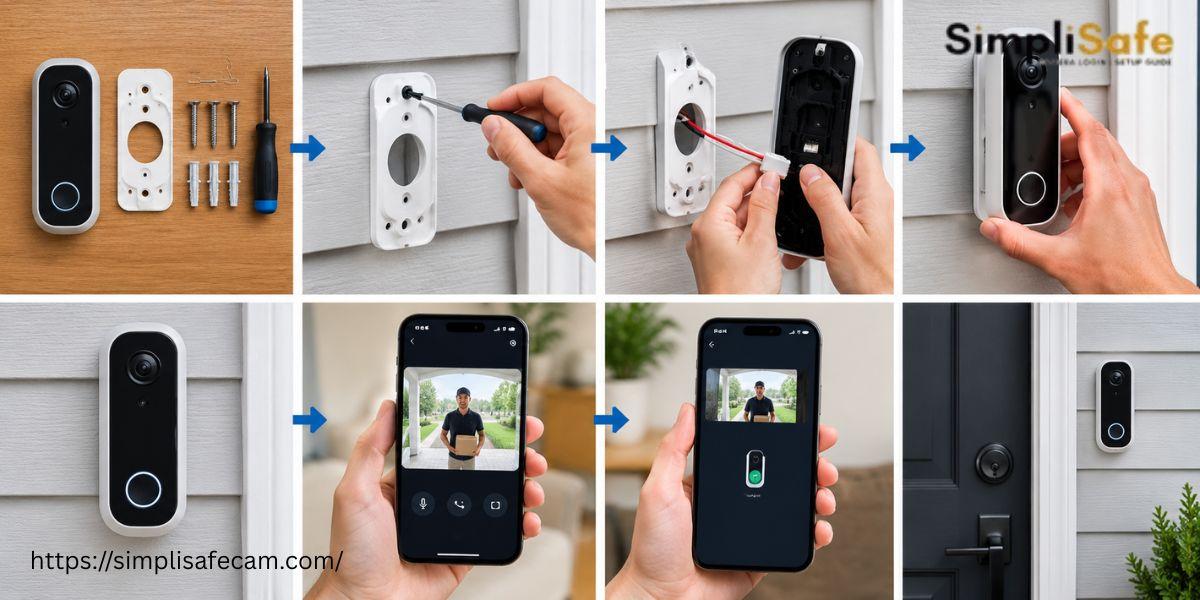
Installing a SimpliSafe Doorbell can improve your home security by helping you monitor visitors from your phone. The process is simple when you follow each step carefully. This guide explains the basic SimpliSafe doorbell installation process along with useful setup tips.
What You Need Before Installation
Before starting the installation process, prepare these items:
-
SimpliSafe Doorbell
-
Mounting bracket
-
Screws
-
Screwdriver
-
Smartphone
-
SimpliSafe mobile app
-
Stable WiFi connection
-
Existing compatible doorbell wiring if required
Check the package to make sure all required parts are available before you begin.
Steps For SimpliSafe Doorbell Installation
1. Turn Off Power
If your doorbell uses existing wiring, turn off power from the electrical breaker. This helps reduce electrical risks during installation.
2. Remove Your Existing Doorbell
Carefully remove the old doorbell from the wall. Disconnect the wires from the existing unit. Keep the wires accessible for the new installation.
3. Attach the Mounting Bracket
Place the SimpliSafe mounting bracket against the wall. Mark the screw positions. Use suitable screws to secure the bracket firmly.
4. Connect the Doorbell
Connect the doorbell wires according to the installation instructions. Make sure the connections are secure. Avoid loose wires since they can cause power problems.
5. Attach the Doorbell
Place the SimpliSafe Doorbell onto the mounting bracket. Make sure the device is firmly attached. Check that the camera has a clear view of the entrance.
6. Restore Power
Turn the breaker back on after completing the wiring. Wait for the doorbell to power up.
7. Open the SimpliSafe App
Open the SimpliSafe app on your smartphone. Sign in to your account. Follow the setup instructions to connect your doorbell to your WiFi network.
8. Test the Doorbell
Press the doorbell button. Check the live camera view. Test motion detection. Confirm that notifications are reaching your smartphone.
SimpliSafe Firmware Update
Keeping your device updated can help improve performance. A SimpliSafe firmware update may include security improvements, bug fixes or device enhancements. Keep your doorbell connected to WiFi during the update process. Avoid disconnecting power while an update is running.
Common Installation Problems
Some users may experience problems after installation. Common issues include:
-
Doorbell not powering on
-
WiFi connection failure
-
Camera showing a poor view
-
Motion alerts not working
-
App unable to detect the doorbell
-
Firmware update problems
Check the wiring, power source, WiFi connection and app settings if you experience these issues.
Conclusion
A proper SimpliSafe doorbell installation can provide reliable monitoring for your home entrance. Follow each installation step carefully. Connect the doorbell to the SimpliSafe app. Test the camera notifications and motion detection after setup. Regular firmware updates can also help maintain device performance.
FAQs
How long does installation take?
Installation can usually be completed within a short time when the required tools plus wiring are ready.
Can I install the SimpliSafe Doorbell myself?
Yes. Many users can complete the installation by following the included instructions carefully.
Why is my SimpliSafe Doorbell not connecting to WiFi?
Check your WiFi signal. Confirm your network credentials. Restart the doorbell then try the setup process again.
How do I update SimpliSafe Doorbell firmware?
Keep the doorbell connected to power plus WiFi. Check the SimpliSafe app for available firmware updates. Follow the instructions shown in the app.

 English
 Arabic
 French
 Spanish
 Portuguese
 Deutsch
 Turkish
 Italiano
 Russian
 Romaian
 Portuguese (Brazil)
 Greek
Greek
